Why can't iQIYI be watched normally overseas?
Many overseas users find that even if their local broadband speed test results are high, they may still encounter issues like playback failure, long loading times, or unstable image quality when opening iQIYI.
This is because watching domestic videos from overseas involves multiple network segments. In addition to the home broadband in the user's region, it also involves local ISPs, international gateways, cross-border transmission lines, domestic network entry points, video platform servers, and content delivery nodes.
Congestion, latency, or connection anomalies in any of these segments can affect the final playback experience.
Common issues when watching iQIYI overseas mainly include the following categories:
● The video page indicates that it cannot be played in the current region;
● The iQIYI client opens, but the video keeps loading;
● Frequent buffering after playing for a while;
● High-definition quality automatically switches to standard definition;
● No image for a long time after dragging the playback progress bar;
● Watching is normal during the day, but it becomes noticeably laggy at night;
● The mobile app can play, but the computer version cannot be watched normally;
● Significant differences in playback performance after changing networks.
When encountering these problems, it is not recommended to immediately assume it is an iQIYI server failure, nor should you judge network quality based on a single speed test. A more effective approach is to first distinguish between content access restrictions, cross-border line fluctuations, and local network issues.
What is the difference between iQIYI region restrictions and video lag?
Although both situations affect viewing, the corresponding solutions are different.
iQIYI indicates region unavailability
If the video has not started playing and the page directly displays that it cannot be watched in your region, content is currently unavailable, or similar prompts, the problem is usually related to content licensing scope, the location of the network exit, or platform access policies.
In this case, even upgrading your local broadband plan may not solve the problem.
It is recommended to check first:
● Whether all videos cannot be played;
● Whether only certain TV series or variety shows are restricted;
● Whether the prompt is the same after changing the mobile network;
● Whether the same situation occurs on both computer and mobile devices;
● Whether multiple VPNs or proxy software are enabled at the same time;
● Whether the current network exit meets the platform's access requirements.
The video can be opened but playback is not smooth
If the video can start playing normally but then experiences spinning, lag, or quality degradation, the problem is more likely to come from network latency, line jitter, data packet loss, node congestion, or unstable local Wi-Fi.
At this point, it is necessary to focus on testing the continuous transmission capability of the line, rather than just focusing on whether the node can connect successfully.
Main reasons for lag when watching iQIYI overseas
1. Long international network routing distance
When overseas devices access domestic video platforms, data usually needs to pass through multiple international network segments. The more complex the transmission path, the higher the possibility of latency and line fluctuations.
Some lines may be geographically close, but the network interconnection quality between operators is poor, and the actual performance is not as good as nodes that are further away.
Therefore, node distance can only be used as a reference and does not directly represent playback speed.
2. Network congestion during evening peak hours
Student apartments, company dormitories, and shared housing usually experience peak network usage in the evening. Multiple people watching videos, downloading games, or performing cloud backups at the same time can lead to a significant drop in available bandwidth.
Some public lines back to China may also have too many users during peak hours, manifesting as smooth playback during the day and frequent buffering at night.
3. High cross-border line latency and jitter
Latency represents the time required for data to complete a round trip. When latency is too high, opening videos, switching episodes, and dragging the progress bar will all become slower.
Jitter indicates whether the latency change is stable. If network latency keeps changing significantly, even if the average download speed is not low, the player may not be able to maintain a stable cache.
4. Data packet loss during transmission
When some data does not reach the device successfully, the system usually needs to retransmit it. Continuous packet loss can cause sound interruptions, screen freezes, reduced clarity, or player connection failures.
A normal speed test usually cannot fully reflect the impact of packet loss on long-term playback, so it needs to be judged by continuous viewing.
5. Interference with home Wi-Fi
The lack of smoothness when watching iQIYI overseas may also have nothing to do with cross-border lines, but is caused by the local wireless network.
Common situations include:
● The router is far from the device;
● There are too many walls in between;
● There are a large number of Wi-Fi signals around;
● Long-term use of the crowded 2.4GHz frequency band;
● The router model is old;
● Too many devices connected to the same network;
● Unknown devices occupying bandwidth.
6. Background programs on the device occupying the network
Cloud drive synchronization, system updates, game updates, video uploads, and file downloads all occupy network bandwidth.
Especially when upload tasks fill up the upstream bandwidth, web requests and video connections may also be affected. When lag occurs on the computer, you should check the Task Manager or system network status to confirm whether any programs are continuously transmitting data.
Do I need to use a return-to-China accelerator to watch iQIYI overseas?
Whether you need to use a return-to-China accelerator should be judged based on specific problems.
If the iQIYI page clearly prompts a regional restriction, or if a direct connection cannot establish a stable domestic video access path, you can consider testing a return-to-China network service that supports domestic audio and video scenarios.
If the video can play but only occasionally lags at night, you should first troubleshoot your home network, background downloads, and Wi-Fi interference. Such problems do not necessarily require changing the accelerator.
The main role of a return-to-China accelerator is to provide a connection path for overseas devices to the mainland China network, and to improve the access experience of some domestic platforms through node scheduling, line optimization, or application traffic splitting.
However, it should be noted that a return-to-China accelerator cannot solve all problems. The final effect still depends on:
● The country or region where the user is located;
● Local broadband operator;
● International gateway quality;
● Usage time;
● Device performance;
● Wi-Fi environment;
● Load of the selected node;
● The status of the video platform itself;
● The licensing scope of specific content.
Therefore, when choosing a return-to-China accelerator, you should prioritize actual testing rather than just referring to advertised speeds or the number of nodes.
What is the difference between a general VPN and a return-to-China accelerator?
Many users treat general VPNs and return-to-China accelerators as the same tool, but their main usage directions are not exactly the same.
Network Tool | Main Purpose | Suitable Audience | Issues to pay attention to when using |
General VPN | Privacy protection, switching network exits, accessing international networks | Users with general network connection needs | Whether it provides lines to mainland China, whether it supports domestic videos |
Audio/Video Accelerator | Optimized for video, music, or live streaming scenarios | Users who mainly watch domestic audio and video content | Which platforms are supported, whether it is stable during peak hours |
Game Accelerator | Reduce game latency and connection fluctuations | Overseas users playing domestic server games | Whether it supports the target game and the region |
Professional Return-to-China Accelerator | Accessing domestic videos, games, and other digital services | International students, overseas Chinese, and long-term residents | Node coverage, multi-device support, privacy policy, and refund rules |
Even if a general VPN can connect successfully, it does not mean it is suitable for long-term iQIYI playback.
Some general VPNs focus more on privacy protection or international network access and may not be optimized for overseas connections to domestic video platforms. Public nodes may also experience congestion at night due to a large number of concurrent users.
For users whose main need is to watch iQIYI, Tencent Video, Youku, or Bilibili, you can prioritize testing return-to-China accelerators that explicitly provide domestic audio and video lines.
How should I choose a return-to-China accelerator?
Check if domestic audio and video platforms are supported
When choosing a product, you should first confirm whether the service explicitly supports domestic video applications such as iQIYI.
Labels like "high-speed network," "global nodes," or "stable connection" do not indicate that the product is suitable for watching domestic videos overseas. It is best to check the supported platforms, operating systems, and service scope, and verify the actual effect through a trial.
Pay attention to node coverage in your region
Different return-to-China accelerators may have different line deployments in North America, Europe, Australia, Japan, Southeast Asia, and other regions.
A product that performs well in the Western United States does not mean it has the same effect in the UK, Germany, or Australia. Therefore, you should prioritize services that cover your region and provide multiple optional entry points.
Test evening playback performance
Fast speeds on return lines during the day do not prove that they are equally stable during peak hours.
It is recommended to test during the time you usually watch videos, such as 7 PM to 11 PM local time. Play continuously for at least 10 to 15 minutes to observe whether buffering, clarity drops, or connection interruptions occur.
Check for automatic line selection support
For users who do not understand network nodes and routing configurations, automatic line recommendation, intelligent path selection, and failover can reduce manual testing costs.
Products that can quickly switch to backup lines when a node is congested are generally more suitable for long-term video viewing.
Confirm multi-device support
Many users switch between mobile phones, tablets, computers, and TVs, so you need to check:
● Whether Windows is supported;
● Whether macOS is supported;
● Whether an iOS client is provided;
● Whether Android is supported;
● Whether TVs or TV boxes are supported;
● Whether multiple devices are allowed to be used simultaneously;
● Whether router configuration is supported.
Read privacy policies and refund rules
Network acceleration tools may process user network connection data, so you should prioritize products that disclose privacy policies, terms of service, and customer service channels.
You should also confirm the trial duration, automatic renewal rules, refund conditions, and plan restrictions to avoid making decisions based solely on low prices or long-term plans.
What usage scenarios is the HiCN return-to-China accelerator suitable for?
For overseas users who need long-term access to domestic videos, games, and digital services, you can use HiCN as one of the candidates for a return-to-China accelerator for testing.
HiCN is mainly aimed at usage scenarios for connecting to the mainland China network from overseas, and its product functions usually revolve around audio/video acceleration, game acceleration, line selection, and multi-device connection.
The following users can focus on such services:
● Watching domestic video platforms like iQIYI long-term from overseas;
● Frequently switching between mobile phones and computers for playback;
● Need to connect to domestic games in addition to watching videos;
● Unfamiliar with complex network configurations;
● Significant international network fluctuations in the region;
● Hope to reduce frequent manual node switching;
● High requirements for continuous playback stability at night;
● Need to access multiple domestic applications simultaneously.
Some return-to-China network products provide intelligent routing, backup nodes, or multi-path transmission functions. These features can provide other options when a single line is heavily loaded, but it does not mean that the same speed can be obtained in all regions.
When testing HiCN or other return-to-China accelerators, it is recommended to use your common devices, common networks, and common viewing times for comparison, and focus on observing the continuous playback effect.
How to test a return-to-China accelerator more accurately?
Step 1: Close other VPNs and proxies
Running multiple network tools at the same time may cause conflicts in DNS, system proxies, and network routing.
Before testing, you should completely exit other VPNs, proxy software, and browser proxy extensions to ensure that only one acceleration tool is running.
Step 2: Record the test environment
For ease of comparison, you should record:
● Country or city of residence;
● Local network operator;
● Test device;
● Operating system;
● Whether using Wi-Fi or a wired connection;
● Test date and time;
● iQIYI video name;
● Playback clarity;
● Node name used.
Step 3: Test unaccelerated status
After closing the acceleration tool, first check whether iQIYI can be opened normally and record the following:
● Page loading speed;
● Whether regional restrictions appear;
● Whether the video can start playing;
● Time required to start playback;
● Whether buffering is frequent;
● Whether clarity automatically drops.
Step 4: Test recommended audio/video lines
After turning on the return-to-China accelerator, prioritize using the audio/video nodes recommended by the client and play the same video.
It is recommended to watch continuously for at least 10 minutes, not just for a few dozen seconds. In a short time, the player may have already pre-loaded some content, which cannot truly reflect line stability.
Step 5: Compare by switching to backup nodes
If the recommended node is still lagging, you can switch to one or two backup nodes and re-test using the same video and clarity.
Only by changing one condition at a time can you judge whether the improvement comes from the node change.
Step 6: Re-test at night
Some nodes perform well when the network is idle, but may drop significantly during peak hours.
Therefore, before preparing for a long-term subscription, you should test during the day and at night respectively. Users who often watch on weekends can also add a weekend test.
How to improve the local network environment?
Prioritize connecting to 5GHz Wi-Fi
When close to the router, 5GHz Wi-Fi usually receives less interference than the 2.4GHz band and is more suitable for high-definition video playback.
If the device is far from the router, you can test both bands separately and should not make judgments based solely on theoretical speeds.
Use a network cable for control testing
The computer can be connected to a network cable for a short time to play the same video.
If the network cable is significantly more stable than Wi-Fi, it means the problem may mainly come from the wireless signal, frequency band congestion, or router position, rather than the return-to-China line.
Pause downloads and cloud synchronization
Before playing a video, you can pause:
● Cloud drive file synchronization;
● System updates;
● Game downloads;
● Mobile photo backups;
● Video uploads;
● Download tools;
● Live streaming and screen recording software.
Reduce concurrent devices on the same network
Family members watching high-definition videos, having video conferences, or downloading large files at the same time will all affect available bandwidth.
If it often lags at night, you can temporarily disconnect unused devices and then test the iQIYI playback effect.
Restart the router and client
Long-term operation of the router may accumulate a large number of connection states, and the client may also have temporary caches or connection anomalies.
Restarting the router, iQIYI client, and return-to-China accelerator can rule out some short-term faults.
Update software versions
You should update the iQIYI client, browser, operating system, and return-to-China accelerator through official channels.
Old versions of software may have compatibility, line identification, or playback component issues, and it is not recommended to use modified applications from unknown sources.
Common misconceptions about using return-to-China accelerators overseas
Misconception 1: The node with the lowest latency is definitely the best
Latency is only one of the indicators for judging line quality. Whether a node is suitable for video playback is also related to jitter, packet loss, actual bandwidth, and peak load.
Lines with slightly higher latency but smaller fluctuations may have a more stable actual playback experience.
Misconception 2: High speed test results mean no lag
Speed tests usually last for a short time and can only reflect the transmission capability at a certain moment.
iQIYI playback requires maintaining data transmission for a long time, so continuous viewing tests are more valuable than single speed tests.
Misconception 3: The closer the node distance, the faster the speed
Cross-border networks do not transmit entirely according to geographic distance. Operator interconnection, international gateways, and line scheduling can all affect the actual path.
The closest node is not necessarily the best choice.
Misconception 4: It is better to have multiple accelerators turned on at the same time
Turning on multiple VPNs or acceleration tools at the same time usually does not superimpose speeds, but may cause routing detours, DNS anomalies, or connection conflicts.
When testing and using, it is recommended to keep only one main network tool.
Misconception 5: Return-to-China accelerators can lift all content restrictions
Different video content may have different copyright licensing scopes, and platform policies may also be adjusted.
Return-to-China accelerators are mainly used to improve network access paths and connection quality, and should not be understood as being able to guarantee that all content can be played in any region.
What should I do if iQIYI still lags overseas?
If you still cannot watch stably after completing the basic settings, you can continue to troubleshoot in the following order:
1. Exit other VPNs, proxies, and network filtering tools;
2. Reconnect to the current return-to-China acceleration node;
3. Switch to an audio/video backup node;
4. Restart the iQIYI client or browser;
5. Clear browser cache;
6. Pause downloads and cloud synchronization;
7. Switch from Wi-Fi to a network cable;
8. Use a mobile hotspot for control testing;
9. Play the same video on another device;
10. Change to other iQIYI content for testing;
11. Record error prompts and the time of occurrence;
12. Contact accelerator customer service to check the line in your region.
When providing feedback to customer service, it is recommended to provide your country, operator, device model, node name, test time, and specific problems. Compared to just describing "playback is very laggy," complete information is more conducive to locating line anomalies.
Common questions about watching iQIYI overseas
Can I watch iQIYI directly overseas?
Some pages and content may be opened directly, but the specific playback scope will be affected by content licensing, location, and platform policies. The situation for different TV series, variety shows, and movies may be different.
Can a return-to-China accelerator improve iQIYI clarity?
Return-to-China accelerators mainly improve network access paths. When the line is more stable and available bandwidth is sufficient, the player may find it easier to maintain high-definition quality, but the final effect still depends on the local network and platform status.
Why does it still lag after the return-to-China accelerator is connected successfully?
Possible reasons include high node load, home Wi-Fi interference, background downloads, local operator congestion, line packet loss, or insufficient device performance. A successful connection only means that the channel has been established, not that the line is always suitable for high-definition video.
Which node should I choose to watch iQIYI overseas?
You can first use the audio/video node recommended by the client, and then test one or two backup lines. When choosing a node, you should comprehensively compare continuous playback, buffering frequency, and recovery speed after dragging the progress bar, rather than just looking at latency numbers.
Which is better, a return-to-China VPN or a return-to-China accelerator?
If your main need is to watch domestic videos, play domestic server games, or use domestic applications for a long time, an accelerator that explicitly supports return-to-China lines and audio/video scenarios is usually more in line with your needs. Whether a general VPN is suitable depends on checking its line direction and platform support.
What should I do if my phone can watch iQIYI but my computer cannot?
You can check computer browser extensions, system proxies, antivirus software, background downloads, and client versions. You can also let your phone and computer connect to the same network for comparison to determine whether the problem comes from the device or the network.
Do I need to keep the accelerator on all the time when watching iQIYI overseas?
Usually, you only need to turn it on when accessing domestic platforms. When using other local or international network services, you can disconnect according to the actual situation to avoid unnecessary routing detours.
Summary
When you encounter regional restrictions, slow loading, or frequent buffering while watching iQIYI overseas, you should first determine which segment the problem occurred in.
If the content prompts that it is unavailable in the region before it starts playing, you should focus on checking the network exit, content licensing scope, and access path. If the video has started playing but the image quality drops or it spins frequently, you need to further troubleshoot cross-border lines, node load, local Wi-Fi, and background programs.
When choosing a return-to-China accelerator, you should focus on comparing domestic audio/video support, nodes in your region, evening stability, backup lines, multi-device compatibility, and privacy and refund policies. HiCN can be one of the candidates for overseas return-to-China network services, but whether it is suitable for a specific user still requires actual testing combined with the region, operator, and common devices.
Using the same video, the same clarity, and similar times to compare the continuous playback performance of direct connection, recommended nodes, and backup nodes is usually easier to find a return-to-China line that suits you than simply comparing speed test numbers.
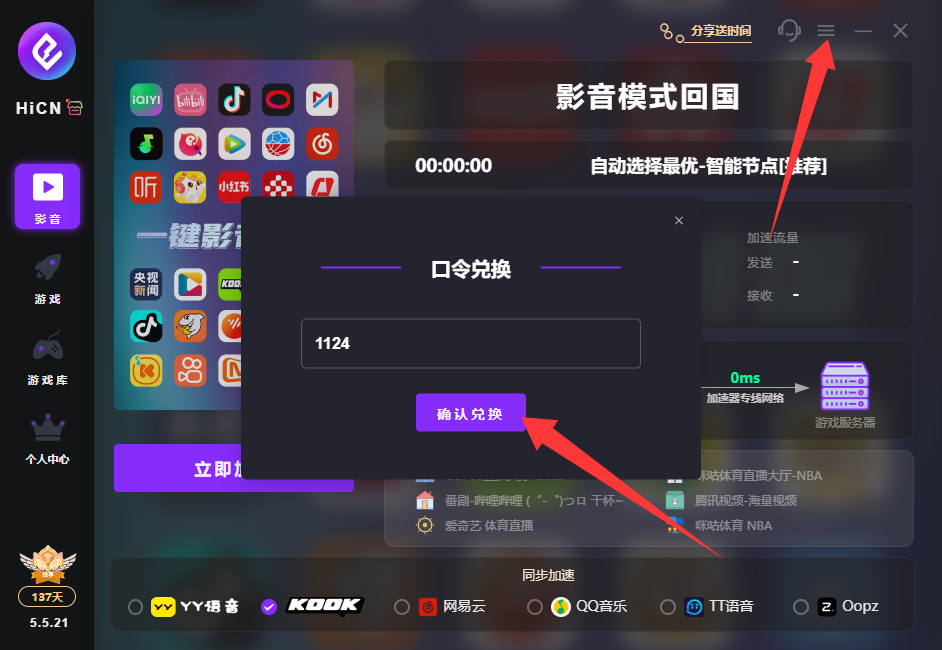
HiCN return-to-China accelerator exclusive member redemption code: 1124